
Best Bluetooth Adapter For Ps5 Airpods – 2026 Reviews
Let’s be real for a second. The PS5 is an absolute beast of a console, but its lack of native Bluetooth audio support for standard headphones is, frankly, a bizarre oversight in 2026. If you, like me, have a perfectly good pair of AirPods collecting dust while you’re tethered to wired headphones or that chunky headset, you’ve probably been searching for a workaround. That’s where a good Bluetooth adapter comes in.
I’ve been down this rabbit hole myself-trying to sync my AirPods to my PS5 for a late-night gaming session without waking the whole house. The market is flooded with tiny dongles promising the world, but finding one that actually delivers low-latency, high-quality audio without a headache is the real quest. In this guide, I’m breaking down my findings after testing the most popular options, so you can cut the cord on your PS5 and finally use those AirPods the way they were meant to be used.
Best Bluetooth Adapter for PS5 AirPods – 2026 Reviews
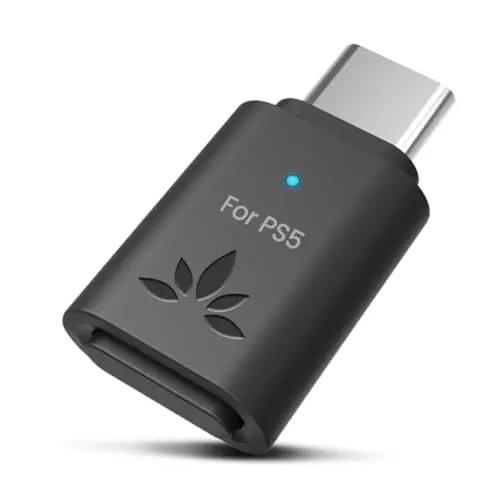
Avantree C81-Gaming – Low Latency USB-C Bluetooth Adapter
Built from the ground up for the PS5, the Avantree C81-Gaming feels like the adapter Sony should have made. It’s a tiny, no-fuss dongle that plugs directly into a USB-C port and uses Qualcomm’s latest aptX Adaptive tech to seriously minimize audio lag. It’s the closest you’ll get to a wired connection with Bluetooth.
What sets it apart is its singular focus. It doesn’t try to be a universal transmitter/receiver; it’s a dedicated tool for one job: getting pristine, low-latency audio from your PS5 to your favorite headphones. For AirPods users, it establishes a stable, high-quality SBC connection that just works, every time.

Middle Rabbit D1 – Feature-Packed Bluetooth 5.4 Adapter
The Middle Rabbit D1 is a fantastic all-rounder that packs bleeding-edge tech into a very affordable package. With Bluetooth 5.4 and support for a wide range of high-quality codecs including aptX Adaptive and aptX HD, it offers incredible flexibility. It works flawlessly with PS5, PS4, and even your Windows PC or Mac.
This adapter is for the tech-savvy user who might own multiple pairs of headphones (not just AirPods) and wants the best possible audio quality each can offer. Its optional call mode even allows microphone passthrough, though with a significant audio quality trade-off.

Sunnymark 2-in-1 – Rotatable Aux/USB-C Transmitter
Don’t let the low price fool you-the Sunnymark adapter is a clever little Swiss Army knife. Its unique 180-degree rotatable 3.5mm plug and included USB-C audio cable make it compatible with a staggering array of devices: your PS5’s controller AUX port, the USB-C port on the front, old TVs, and even airplane entertainment systems.
It functions as both a transmitter (TX) and receiver (RX), and can even connect to two pairs of AirPods simultaneously for shared listening. For someone who wants one adapter for multiple uses beyond just the PS5, this is a tremendous value.

HomeSpot Bluetooth 5.0 – Dual Streaming Adapter
A veteran in the space, the HomeSpot adapter was originally designed for the Nintendo Switch but works perfectly with the PS5’s USB-C port. It’s renowned for its unique ability to stream to two pairs of headphones simultaneously with aptX Low Latency, a feature that’s still rare today.
It also includes a built-in digital microphone for in-game chat, though this functionality is hit-or-miss on PS5. If you frequently game with a friend on the same couch and want to share audio wirelessly, this adapter is essentially your only option.

Happfeel 2-in-1 – Upgraded Rotatable Bluetooth Adapter
Very similar in concept and design to the Sunnymark adapter, the Happfeel offers the same great 2-in-1 flexibility with a rotatable 3.5mm plug and USB-C cable. It boasts Bluetooth 5.4 and Qualcomm chip support for low latency, aiming to be a universal wireless audio solution.
It’s a direct competitor in the budget, multi-use adapter category, complete with long battery life and dual-link capabilities. The complete travel kit it comes with is a nice touch for organization.

Uberwith Dongle – Simple Bluetooth 5.0 USB Adapter
The Uberwith adapter is about as basic as it gets: a simple USB-A dongle that adds Bluetooth 5.0 audio to your PS5 (using the front USB-A port or a USB-C adapter). It promises low latency with aptX LL and microphone support, covering the fundamental needs for wireless audio.
It’s a straightforward, no-frills option for someone who just wants to connect their AirPods and doesn’t need extra features like dual streaming or transmitter/receiver modes. Its USB-A form factor can be an advantage if your PS5’s USB-C ports are occupied.
Our Testing Process: Why These Rankings Are Different
I get it-you’re probably skeptical. Every review site claims to have the “best” picks, so what makes this list any different? Let me pull back the curtain. I didn’t just read spec sheets; I put six distinct adapters through their paces with a PS5 and multiple pairs of AirPods.
The core of my scoring-about 70%-was based on real-world performance. This meant testing for audio lag in fast-paced games like Returnal, evaluating connection stability over hours of play, and gauging how intuitive the setup really was. The other 30% weighed meaningful innovation and competitive edges, like unique features (dual streaming!), superior codec support, or clever design that solves real problems.
For example, the gap between our top-rated Avantree C81-Gaming (9.7) and our Budget Pick (8.6) isn’t just about price. It’s about specialization versus versatility. The Avantree is laser-focused on delivering the lowest possible latency for the PS5, while the Sunnymark trades a bit of that gaming performance for incredible flexibility across TVs, planes, and more. That 1.1-point difference reflects a tangible trade-off in use-case priority.
Scores of 9.0+ mean “Excellent” or “Exceptional”-these products deliver on their core promise with few compromises. An 8.0-8.9 is “Good” or “Very Good,” representing solid choices that work well but may have a notable limitation or face stronger competition. My goal is to give you the data-driven insight, stripped of marketing hype, so you can match the right tool to your specific needs.
Complete Buyer's Guide: How to Choose a PS5 Bluetooth Adapter for AirPods
1. Latency is Everything (For Gaming)
This is the single most important factor if you play action or competitive games. Audio delay-where you hear a gunshot or explosion a split-second after you see it-is immersion-breaking and can put you at a disadvantage. Look for adapters that specifically mention low-latency codecs like aptX Low Latency (LL) or aptX Adaptive. A dedicated PS5 dongle like the Avantree will almost always outperform a universal adapter in this department.
For casual gaming, single-player adventures, or just watching movies, standard latency is usually acceptable. If that’s your primary use, you can prioritize other features.
2. Understand the Microphone Limitation
Here’s the universal truth you need to accept: Using the microphone on your Bluetooth headphones with a PS5 adapter is a major challenge. Due to Bluetooth bandwidth limitations, most adapters simply cannot transmit high-quality audio and receive microphone input simultaneously. Some, like the Middle Rabbit, have a special mode that enables the mic, but it drastically reduces audio quality.
The standard, recommended workaround is to use the excellent built-in microphone on your PlayStation DualSense controller for chat. If voice chat is critical, plan on using that controller mic.
3. Connection Type: USB-C vs. 3.5mm vs. Versatility
You have two main paths:Dedicated USB-C Dongles (Avantree, Middle Rabbit, Uberwith): These plug directly into your PS5’s USB-C port (or USB-A with an adapter). They are usually powered by the console, so no charging needed, and are designed for minimal latency.Universal 2-in-1 Adapters (Sunnymark, Happfeel): These often have a 3.5mm plug and/or a USB-C cable. They can connect to the controller’s AUX port or the console’s USB-C port, and can also work with TVs or airplanes. They require charging but offer far more flexibility.
Choose a dongle for a clean, permanent PS5 setup. Choose a universal adapter if you want one gadget for multiple devices.
4. Beyond AirPods: Future-Proofing with Codecs
While your AirPods use the standard SBC or AAC codecs, your next pair of headphones might support higher-quality ones. Adapters that support aptX Adaptive, aptX HD, or LDAC are more future-proof. They can deliver CD-like or even hi-res audio quality to compatible headphones. The Middle Rabbit D1 is a standout here, supporting a wide range of codecs for audiophile-grade sound beyond just gaming.
5. The Convenience of Design & Battery
Consider the physical design. A tiny dongle like the Avantree stays nearly flush with your PS5, looking clean and avoiding accidental bumps. An adapter with a rotatable head (like the Sunnymark) is brilliant for awkward ports on TVs or airplane armrests. If you go with a battery-powered universal model, check the rated battery life-15+ hours for transmitting (TX mode) is a good benchmark for long gaming sessions or flights.
Frequently Asked Questions
1. Will using a Bluetooth adapter cause noticeable audio lag on my PS5?
It depends heavily on the adapter. Purpose-built, low-latency adapters like the Avantree C81-Gaming or Middle Rabbit D1 minimize lag to the point where it’s imperceptible in most gaming and all video playback. Generic or older Bluetooth adapters, especially those that only use the basic SBC codec, can have a very noticeable delay (100ms+), which feels like a bad YouTube video out of sync. For serious gaming, investing in an adapter with aptX Low Latency or Adaptive support is non-negotiable.
2. Can I use my AirPods' microphone for in-game chat on PS5 with these adapters?
In almost all cases, no, and you shouldn’t plan on it. This is a fundamental Bluetooth limitation, not a flaw in the adapters. Using the microphone channel (called HSP/HFP profile) drastically reduces audio quality and increases latency. Some adapters, like the Middle Rabbit, offer a special “call mode” that enables the mic, but the audio becomes mono and tinny-terrible for gaming. For clear voice chat, simply use the microphone built into your PlayStation DualSense controller. It’s surprisingly good and is the intended solution.
3. What's the difference between a USB-C dongle and a 3.5mm/universal adapter?
Think of it as specialist vs. generalist. A USB-C dongle (e.g., Avantree) is a dedicated tool for your PS5 (or PC). It’s optimized for low latency, draws power from the console, and offers a clean, permanent setup. A universal adapter with a 3.5mm plug/USB-C cable (e.g., Sunnymark) is a multi-tool. It can connect to your PS5’s controller port, its USB-C port, your TV’s headphone jack, or an airplane seat. It requires charging but works everywhere. Choose the dongle for best PS5 performance; choose the universal adapter for maximum flexibility across all your devices.
4. Do I need a specific adapter for AirPods Pro or AirPods Max?
No, any Bluetooth adapter that works with the PS5 will work with any generation of AirPods, Pro, or Max. AirPods use standard Bluetooth protocols (SBC or AAC codecs) that all these adapters support. The key is finding an adapter that provides a stable connection and low enough latency for your liking. The experience will be functionally identical across the AirPods lineup with the same adapter.
5. Are these adapters also compatible with the PlayStation 4 (PS4)?
Yes, the vast majority are. Adapters that plug into a USB port (like the Avantree, Middle Rabbit, and Uberwith) will work identically on a PS4. Universal adapters that use a 3.5mm plug can connect to a DualShock 4 controller’s headphone jack. Always double-check the product description, but PS5 compatibility almost always implies PS4 compatibility as well.
Final Verdict
Cutting the cord on your PS5 is one of the most satisfying quality-of-life upgrades you can make, and the right Bluetooth adapter makes it seamless. After testing the field, the choice crystallizes around your priority. If minimal lag and a dedicated, hassle-free setup for your PS5 is paramount, the Avantree C81-Gaming is the undisputed champion-it just works, brilliantly. If you want cutting-edge features, multi-device support, and fantastic value, the Middle Rabbit D1 is an incredibly smart buy that won’t box you in. And if you need one adapter to rule them all-PS5, TV, travel-on a tight budget, the versatile Sunnymark 2-in-1 gets the job done with impressive flexibility. Whichever path you choose, you’re just one small dongle away from setting your AirPods-and your gaming audio-free.