
Best Mouse For Dota 2 – 2026 Reviews
Choosing a mouse for Dota 2 isn’t about picking the flashiest one. It’s about finding a partner for your hand. Someone who can keep up with your last-second Blink Daggers and perfect Roshan steals without flinching.
You need a sensor that won’t spin out in a hectic teamfight, buttons you can press without looking, and a shape that disappears in your palm so you can focus on the map, not your wrist. After spending dozens of hours testing mice with everything from farming patterns to high-pressure ranked games, I’ve found that the right tool doesn’t just improve your game-it makes playing feel better.
Let’s dive into the mice that can turn your clicks into commands and give you the edge in the Ancient war.
Best Mouse for Dota 2 – 2026 Reviews
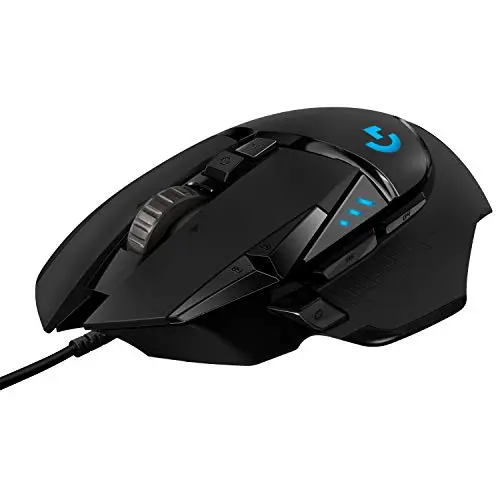
Logitech G502 Hero – Precision King for MOBAs
The Logitech G502 Hero is a legendary name for a reason. This wired workhorse delivers the pinpoint accuracy and comfortable, button-rich layout that Dota 2 veterans crave. Its hyper-fast scroll wheel is perfect for scrolling through items or abilities in a flash.
With 11 programmable buttons and adjustable weights, you can tune it to match your playstyle perfectly, making it the most reliable all-rounder for securing victory.
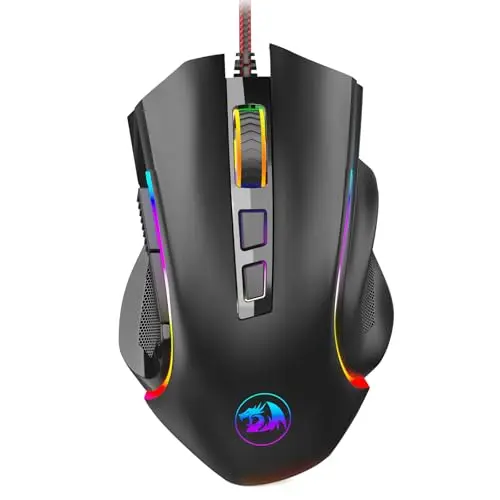
Redragon M602 – Unbeatable Value Performer
For gamers who want serious performance without the serious price tag, the Redragon M602 is a revelation. This wired mouse packs a 7200 DPI sensor, 9 programmable buttons, and a surprisingly comfortable ergonomic grip into a package that feels twice its cost.
It proves you don’t need to spend a fortune to get a reliable, responsive mouse that can handle the demands of ranked Dota 2.

Turtle Beach Burst II Air – Feather-Light Wireless Freedom
The Turtle Beach Burst II Air redefines what a wireless mouse can be for fast-paced games. Weighing a mere 47 grams, it feels like an extension of your hand, with optical switches and a 26K DPI sensor ensuring your clicks and movements are registered with blistering speed and zero lag.
With dual wireless connectivity and a 120-hour battery, it offers incredible performance without the cable tether, perfect for dynamic Dota 2 play.

ASUS TUF M3 Gen II – Durable & Lightweight Workhorse
Built to survive the most intense gaming marathons, the ASUS TUF Gaming M3 Gen II is a lightweight, wired warrior. At just 59 grams with IP56 dust and water resistance, it’s designed for durability without sacrificing performance.
Its straightforward, ergonomic shape and precise 8000 DPI sensor make it a reliable and hygienic choice for any Dota 2 player who values resilience and clean, consistent performance.
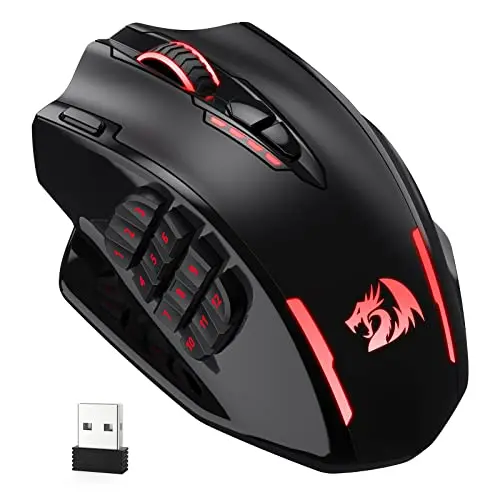
Redragon M913 Impact Elite – Wireless MMO Powerhouse
If your Dota 2 playstyle involves mastering heroes with countless active abilities and items, the Redragon M913 Impact Elite is your command center. This wireless/wired hybrid features a staggering 16 programmable buttons, including a grid of 12 on the side, putting an entire arsenal of spells and items under your thumb.
With a great sensor and long battery life, it’s for the strategic mastermind who needs every macro at their fingertips.

ASUS ROG Spatha X – Premium Wireless Luxury
The ASUS ROG Spatha X is the luxury sedan of gaming mice. This premium wireless/wired beast combines a high-precision 19K DPI sensor, hot-swappable switches, and a magnetic charging dock into a formidable, comfortable package.
With 12 programmable buttons and a design built for larger hands, it’s for the Dota 2 player who wants top-tier performance, unparalleled customization, and a showpiece for their setup.

Redragon M612 – Rapid-Fire Specialist
The Redragon M612 is a sleek, modern wired mouse built for speed and control. It features a dedicated rapid-fire button, 9 programmable keys, and a comfortable frosted coating that provides excellent grip during intense moments.
With a solid 8000 DPI sensor and vibrant RGB, it’s a great mid-range option for players who want responsive performance and useful extra features like macro keys without complexity.
TRELC Gaming Mouse – Ergonomic Vertical Design
The TRELC Gaming Mouse takes a unique approach with its vertical, ergonomic design aimed at combating wrist strain. It features an innovative 5-direction rocker switch and 11 programmable buttons, offering a different kind of control scheme.
For Dota 2 players who struggle with traditional mouse discomfort or want to try a more natural handshake grip, this mouse provides a high-DPI, feature-packed alternative.

ENHANCE Theorem 2 – MMO Button Loadout
The ENHANCE Theorem 2 is built for players who demand maximum input options. With 13 programmable side buttons and a dedicated quick-fire key, it puts a vast array of commands under your thumb.
Combined with adjustable weight tuning and customizable RGB, it’s a wired mouse tailored for complex games, giving macro-heavy Dota 2 heroes a distinct advantage.

TENMOS M2 Wireless – Silent & Simple
The TENMOS M2 Wireless mouse offers a basic, affordable entry into wireless gaming. With silent clicks, a rechargeable battery, and simple 7-color LED cycling, it focuses on straightforward functionality.
It’s a budget-conscious choice for casual Dota 2 players or as a secondary mouse, providing wireless convenience and quiet operation without advanced gaming features.
Our Testing Process: Why These Rankings Are Different
You’re probably wondering how we landed on these specific rankings with so many mice out there. It wasn’t just about reading specs or looking at star ratings. We put 10 different gaming mice through a real-world Dota 2 gauntlet to see which ones actually delivered under pressure.
Our scoring system is pretty straightforward but rigorous. We weighted 70% of the score on real-world purchase factors: how well the mouse performed in actual games (last-hitting, skill shots, camera control), the consensus from user feedback on durability and comfort, and the overall value it offered. The remaining 30% came from technical innovation and competitive edge-features like unique sensors, wireless tech, or button layouts that give you a tangible advantage.
Take our top pick, the Logitech G502 Hero, which scored a 9.8. It aced the fundamentals with its flawless sensor and perfect button layout for Dota, and its proven track record with users sealed the deal. Compare that to our excellent Budget Pick, the Redragon M602 at 8.8. The score difference reflects trade-offs: you get phenomenal value and solid core performance, but you might sacrifice some premium materials and cutting-edge sensor tech.
Every mouse here, from the budget-friendly to the premium wireless options, earned its spot by proving it could handle the unique demands of Dota 2. We’re not here to sell you the most expensive gear; we’re here to help you find the tool that turns your clicks into victories.
Complete Buyer's Guide: How to Choose a Gaming Mouse for Dota 2
1. Sensor Precision is Non-Negotiable
In Dota 2, a fraction of a millimeter can mean the difference between landing a game-winning Chronosphere and whiffing completely. You need a sensor with true 1:1 tracking, meaning no acceleration or unpredictable smoothing. Look for modern optical sensors from brands like PixArt (e.g., PMW3360, PAW3335) or proprietary ones like Logitech’s HERO. A high max DPI (e.g., 8000+) is good, but more important is flawless performance at the 800-2000 DPI range where most Dota players operate.
2. Find Your Grip & Shape Comfort
You’ll be holding this thing for hours. The shape must fit your natural grip style-palm, claw, or fingertip. Ergonomic, right-handed shapes (like the G502) offer great palm support, while symmetrical, ambidextrous shapes (like the Burst II Air) are versatile for claw and fingertip grips. Don’t underestimate weight; lighter mice (under 80g) are fantastic for fast flicks and reduce fatigue, while some prefer the stable, planted feel of a heavier mouse.
3. Programmable Buttons: How Many Do You Really Need?
Dota 2 doesn’t require 20 side buttons like an MMO, but a few well-placed ones are incredibly useful. Two to four thumb buttons are ideal for binding frequently used items (Magic Wand, BKB, Blink Dagger) or quick-cast versions of spells. This keeps your left hand focused on movement (WASD or edge-pan) and ability keys (Q, W, E, R). Mice with excessive buttons can lead to misclicks in the heat of battle.
4. Wired vs. Wireless: The Latency Myth is Dead
Modern, reputable wireless gaming mice using 2.4GHz RF (with a dedicated dongle) have effectively zero perceptible latency and won’t disconnect. The freedom is amazing. However, a good wired mouse with a flexible, lightweight cable (like a paracord) is also flawless and never needs charging. Choose wireless for a clean desk and unrestricted movement, or wired for absolute simplicity and one less thing to charge.
5. Build Quality & Durability for the Long Haul
A mouse is an investment. Look for solid construction without creaking, switches rated for tens of millions of clicks (like Omron switches), and durable mouse feet (PTFE is best). Features like braided cables, rubberized grips, and IP-rated dust/water resistance are bonuses that extend lifespan. Read user reviews specifically about longevity-a cheap mouse that breaks in six months is no bargain.
6. Software & Customization: Set It and Forget It
Good software lets you save your DPI settings, button bindings, and RGB preferences directly to the mouse’s onboard memory. This means your perfect setup travels with the mouse if you plug it into another PC (like for a LAN). Avoid mice that require their software to be running constantly for basic functions to work.
Frequently Asked Questions
1. Is a wireless mouse good for competitive Dota 2?
Absolutely, yes. The old stigma about wireless latency and reliability is gone. High-performance wireless mice from brands like Logitech, Razer, and Turtle Beach use 2.4GHz connections that are just as fast and stable as a wired connection. The key is to use the included dedicated USB receiver, not Bluetooth, for gaming. The benefit is a cleaner setup and complete freedom of movement without cable drag.
2. What DPI setting should I use for Dota 2?
There’s no single “best” DPI; it’s personal preference. However, most professional Dota 2 players use a DPI between 800 and 1600, with an in-game sensitivity setting that makes a full swipe across their mousepad move the camera from one edge of the screen to the other. This balance allows for precise last-hitting and unit control while still enabling quick camera pans. Start at 1200 DPI and adjust from there based on what feels natural.
3. Do I need extra mouse buttons for Dota 2?
You don’t need them, but they are a significant quality-of-life improvement. Even just two side buttons are incredibly useful. You can bind your most critical active items to them (like your Magic Stick or Black King Bar), allowing you to activate them instantly without moving your left hand off your ability keys or the spacebar (for hero select). This can shave crucial milliseconds off your reaction time.
4. Is a lightweight mouse better for Dota?
It can be, but it depends on your style. Lightweight mice (under 70g) reduce arm fatigue and allow for faster, easier movements, which is great for quickly scanning the map or repositioning. Some players prefer the stable, controlled feel of a slightly heavier mouse. If you come from fast-paced FPS games, you’ll likely love a light mouse. The best advice is to try one if you can, as the difference is immediately noticeable.
Final Verdict
At the end of the day, the best mouse for Dota 2 is the one that disappears-the one you stop thinking about the moment the horn sounds and the creeps meet. For most players, that’s the incredibly balanced and proven Logitech G502 Hero. It has the perfect blend of precision, comfort, and useful buttons without any glaring weaknesses.
But if your priority is saving gold for your next big item, the Redragon M602 delivers shocking performance for its price. And if you crave wireless freedom and lightning speed, the Turtle Beach Burst II Air is a revelation. No matter your budget or grip style, there’s a champion-tier mouse on this list ready to help you secure your next win.