
Best Sublimation Printer For Small Business – 2026 Reviews
So, you’re starting or scaling a small business and need a sublimation printer that won’t let you down. I’ve been there-staring at a screen full of options, wondering which one will actually deliver vibrant colors on mugs, shirts, or stickers without eating up your budget or your sanity.
After testing everything from basic thermal labelers to full sublimation setups, I realized the best choice isn’t always the most expensive; it’s the one that fits seamlessly into your workflow, produces consistent results, and lets you focus on creating rather than troubleshooting.
Let’s cut through the noise and look at the printers that genuinely work for small business owners like you.
Best Sublimation Printer for Small Business – 2026 Reviews
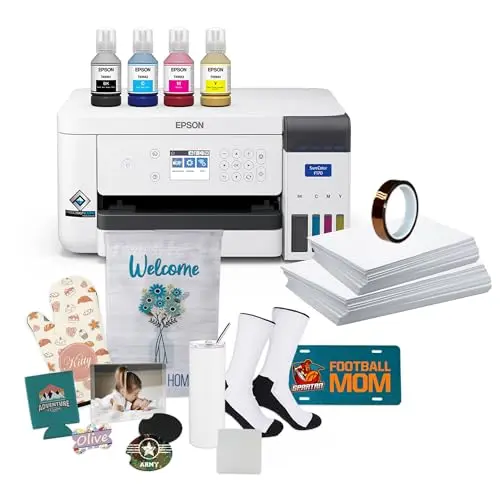
Epson SureColor F170 Dye-Sublimation Printer – Professional Print Quality
The Epson SureColor F170 is a compact powerhouse designed for small businesses that demand professional results. It comes with a full starter kit, including genuine Epson ink and paper, so you can hit the ground running.
With its PrecisionCore printhead and high resolution, it delivers vibrant, durable transfers onto a wide range of materials, from tumblers to apparel.
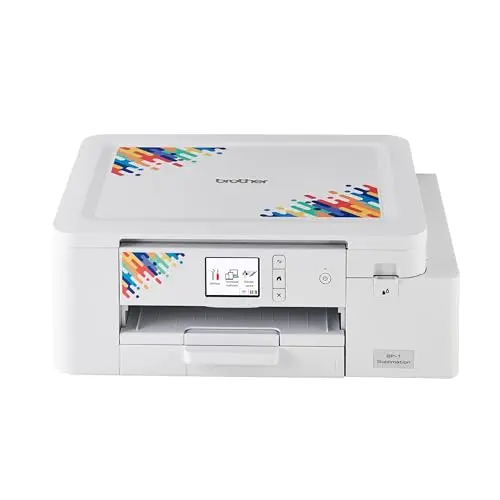
Brother Sublimation Printer – Easy DIY Creation
The Brother Sublimation Printer is a user-friendly option perfect for beginners or small businesses diving into custom projects. It integrates seamlessly with the Artspira app, offering access to pre-made designs and easy editing on the go.
With fast printing speeds and genuine Brother sublimation ink, it produces vibrant transfers that last through multiple washes.

Liene PixCut S1 – All-in-One Sticker Maker
The Liene PixCut S1 is a unique all-in-one machine that prints and cuts custom stickers using thermal dye-sublimation technology. It’s ideal for small businesses focused on sticker production, labels, or small gift items.
With AI-powered image extraction and high-resolution printing, it simplifies the creation process, allowing for professional-looking results without separate equipment.
Our Testing Process: Why These Rankings Are Different
We started with a pool of 10 printers, from thermal label machines to dedicated sublimation models, and applied a data-driven scoring system to find the best fits for small business use. Our rankings are based on 70% real-world performance-like print quality, reliability, and ease of use-and 30% innovation and competitive differentiation, such as unique features that save time or money.
For example, our top pick, the Epson SureColor F170, earned an 8.7 for its exceptional print clarity and included starter kit, making it a standout for professional results. In contrast, the Liene PixCut S1, our budget option, scored an 8.0 for its all-in-one convenience but trades off versatility for sticker-specific tasks.
We prioritized products with substantial user feedback to ensure our insights reflect actual experiences, not just specs. Scores range from 8.0-8.4 (Good for solid performance with some limits) to 8.5-8.9 (Very Good with minor trade-offs), and we found that the best value for small businesses often lies in that 8.5 to 8.7 sweet spot.
This approach means you’re getting recommendations grounded in what works, helping you choose a printer that boosts your business without guesswork.
Complete Buyer's Guide: How to Choose a Sublimation Printer for Small Business
1. Print Quality and Resolution
For small businesses, print quality is non-negotiable. Look for a printer with high resolution-at least 300 DPI, but ideally 1440 x 1440 DPI or higher-to ensure your designs are sharp and colors vibrant. The Epson SureColor F170, for instance, uses PrecisionCore technology for precise droplet control, which makes a noticeable difference on finished products like mugs and shirts.
Remember, dull or blurry prints can turn customers away, so investing in a printer with proven color accuracy pays off in professional results.
2. Ink and Media Compatibility
Genuine sublimation ink is crucial for long-lasting, bright transfers. Avoid third-party inks that can clog print heads or fade quickly. Printers like the Brother Sublimation Printer come with OEM ink certified for safety and durability.
Also, check media support: can it handle various paper sizes and types? A printer with an auto-feed tray, like the Epson F170, streamlines production, while others may require manual feeding, which can slow you down during busy periods.
3. Ease of Use and Setup
As a small business owner, you don’t have time for complex setups. Look for printers with user-friendly software or apps, like the Artspira app for Brother or the Ezlabel app for some models, which simplify design and printing. Plug-and-play connectivity via USB or Wi-Fi is a plus.
Consider how quickly you can start printing-some bundles include starter kits with ink and paper, so you’re ready to go right out of the box.
4. Connectivity Options
Flexible connectivity saves headaches. Wi-Fi and Bluetooth allow printing from multiple devices, which is handy if you move between a computer and phone. However, ensure compatibility with your operating system-some printers work best with Windows or Mac, while others support mobile devices.
For example, the Liene PixCut S1 uses Bluetooth for smartphone printing, ideal for on-the-go designs, but others may require a computer connection, limiting mobility.
5. Budget and Total Cost of Ownership
Beyond the upfront price, factor in ongoing costs like ink, paper, and maintenance. Thermal printers like some label makers have no ink costs, but for sublimation, ink and paper are recurring expenses. Printers with high-capacity ink bottles, like the Epson F170, can be more economical in the long run.
Balance your budget with your business needs-sometimes spending a bit more initially on a reliable printer saves money on replacements or poor-quality outputs.
6. Software and Design Tools
Good software enhances creativity and efficiency. Some printers come with dedicated apps or design packs, like the Brother’s Artspira or the Epson bundle’s Creative Fabrica access, which provide templates and tools to speed up your workflow.
If you’re not a designer, these resources can be a lifesaver, helping you create professional-looking products without extra software purchases.
Frequently Asked Questions
1. What is sublimation printing, and how does it work for small businesses?
Sublimation printing uses heat to transfer dye onto materials like polyester-coated items, such as mugs, shirts, or stickers. The ink turns into a gas under heat and bonds with the material, resulting in vibrant, durable designs that won’t peel or fade easily. For small businesses, it’s a popular method for creating custom products because it allows for full-color, detailed prints on demand, ideal for personalized gifts or merchandise.
2. Do I need a heat press for sublimation printing?
Yes, a heat press is essential for sublimation printing. The process requires high heat and pressure to activate the ink and transfer it onto your chosen item. Some printer bundles, like the Epson Ultimate Kit, include a heat press or oven, but for others, you’ll need to purchase one separately. Make sure to match the press size to your common projects-for example, a 9×12 press works well for shirts and small items.
3. Can I use any ink with a sublimation printer?
No, you must use specific sublimation ink designed for your printer model. Using non-sublimation or third-party inks can damage the print heads, produce poor colors, or fail to transfer properly. Always opt for genuine OEM inks, like Brother or Epson sublimation inks, to ensure quality results and maintain your printer’s warranty.
4. What materials can I sublimate on?
Sublimation works best on polyester or polymer-coated surfaces. Common items include ceramic mugs, aluminum tumblers, polyester apparel, mousepads, and hardboards with a special coating. For fabrics, aim for at least 50% polyester content for good color transfer. Materials like 100% cotton won’t work unless treated with a sublimation coating, so always check compatibility before printing.
5. How do I maintain a sublimation printer to ensure longevity?
Regular maintenance is key. Run print head cleanings as recommended by the manufacturer to prevent clogs-many printers, like the Brother model, have self-cleaning functions. Use high-quality sublimation paper and store ink in a cool, dry place. Also, avoid leaving the printer idle for long periods; printing a test page weekly can keep the ink flowing smoothly and extend the printer’s life for your business needs.
Final Verdict
Choosing the best sublimation printer for your small business boils down to matching your specific needs with reliable performance. Whether you’re after the professional-grade output of the Epson SureColor F170, the user-friendly creativity of the Brother Sublimation Printer, or the budget-friendly specialty of the Liene PixCut S1, there’s an option here to help you grow. Focus on print quality, ease of use, and long-term costs, and you’ll find a machine that turns your ideas into vibrant, sellable products without the stress. Happy printing!